
AI Agent Integration: Connecting LLMs to Your Business Tools
AI Agent Integration: Connecting LLMs to Your Business Tools
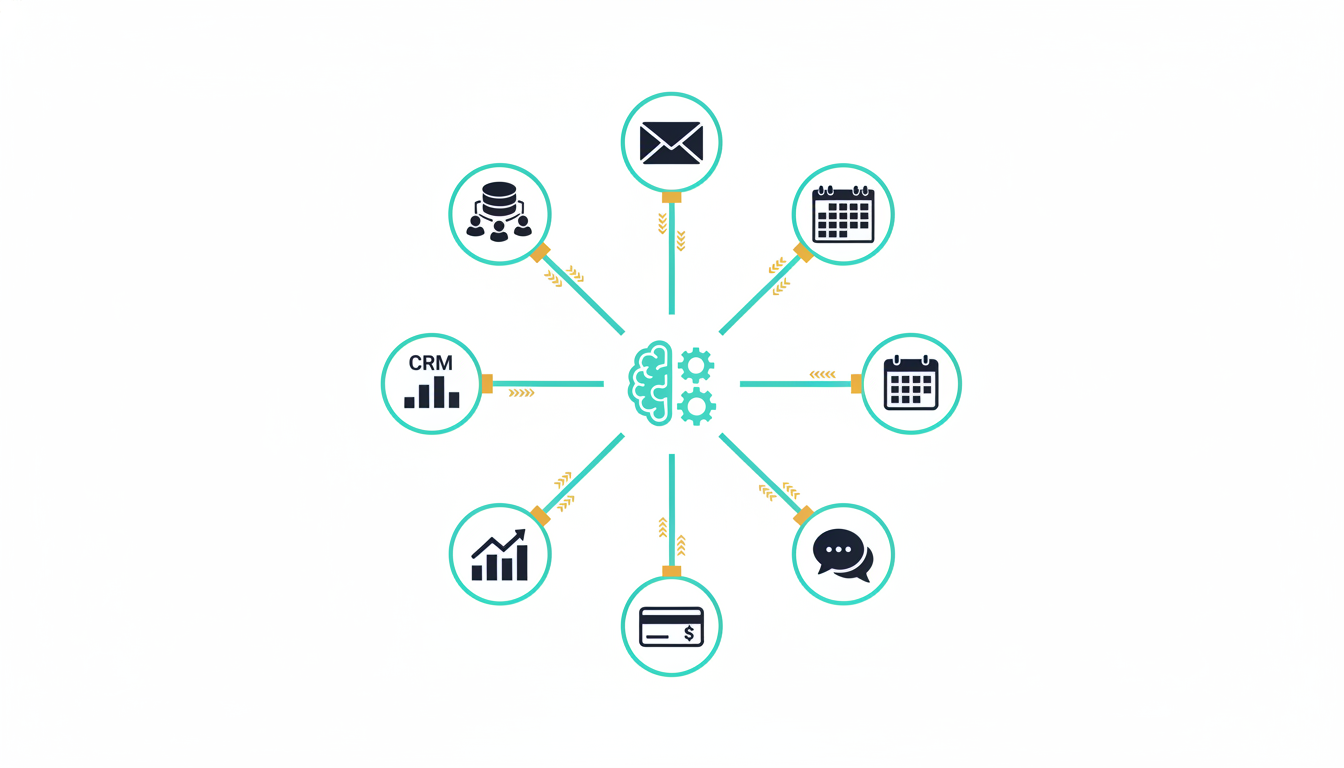
The most transformative AI implementations in 2026 are not standalone chatbots - they are AI agents deeply integrated with business systems. An AI agent that can query your CRM, update your project management tool, pull data from your data warehouse, and trigger workflows in your internal systems is exponentially more valuable than one that can only generate text. The shift from "AI as text generator" to "AI as autonomous workflow executor" is the defining trend in enterprise AI adoption.
However, connecting large language models to production business tools introduces challenges that most teams underestimate: authentication, rate limiting, error handling, data privacy, hallucination guardrails, and auditability. A prototype that calls an API is trivial to build. A production system that does so reliably, securely, and at scale requires disciplined engineering.
Our team at QAOcean has built AI agent integrations across CRM platforms, ERP systems, healthcare databases, and custom internal tools. This guide covers the architecture patterns, security considerations, and practical techniques our engineers use.
Key Takeaways
- Tool-calling (function calling) is the foundation of AI agent integration - it allows LLMs to invoke structured functions with validated parameters instead of generating raw API calls.
- Retrieval-Augmented Generation (RAG) gives agents access to your proprietary data without fine-tuning, but the retrieval pipeline quality determines the agent's usefulness.
- Security is non-negotiable - AI agents must operate with least-privilege permissions, and every action must be auditable.
- Guardrails prevent costly mistakes - confirmation loops, output validation, and human-in-the-loop checkpoints keep agents from executing harmful actions.
- Start with read-only integrations and expand to write operations only after establishing trust through monitoring and validation.
What Is an AI Agent?
An AI agent is a system where a large language model (LLM) acts as the reasoning core, deciding which actions to take and in what sequence to accomplish a goal. Unlike a simple chatbot that generates text responses, an agent can:
- Observe: Retrieve information from databases, APIs, and documents.
- Reason: Analyze the retrieved information, determine what actions are needed, and plan a sequence of steps.
- Act: Execute actions - sending emails, updating records, creating tickets, triggering deployments.
- Reflect: Evaluate the results of its actions and adjust its approach.
The critical capability that makes this possible is tool-calling (also called function calling). Modern LLMs from OpenAI, Anthropic, Google, and open-source providers support structured tool definitions that tell the model what functions are available, what parameters they accept, and what they return. The model outputs a structured tool-call request rather than free-form text, and your application executes the function and returns the result.
Architecture Patterns for AI Agent Integration
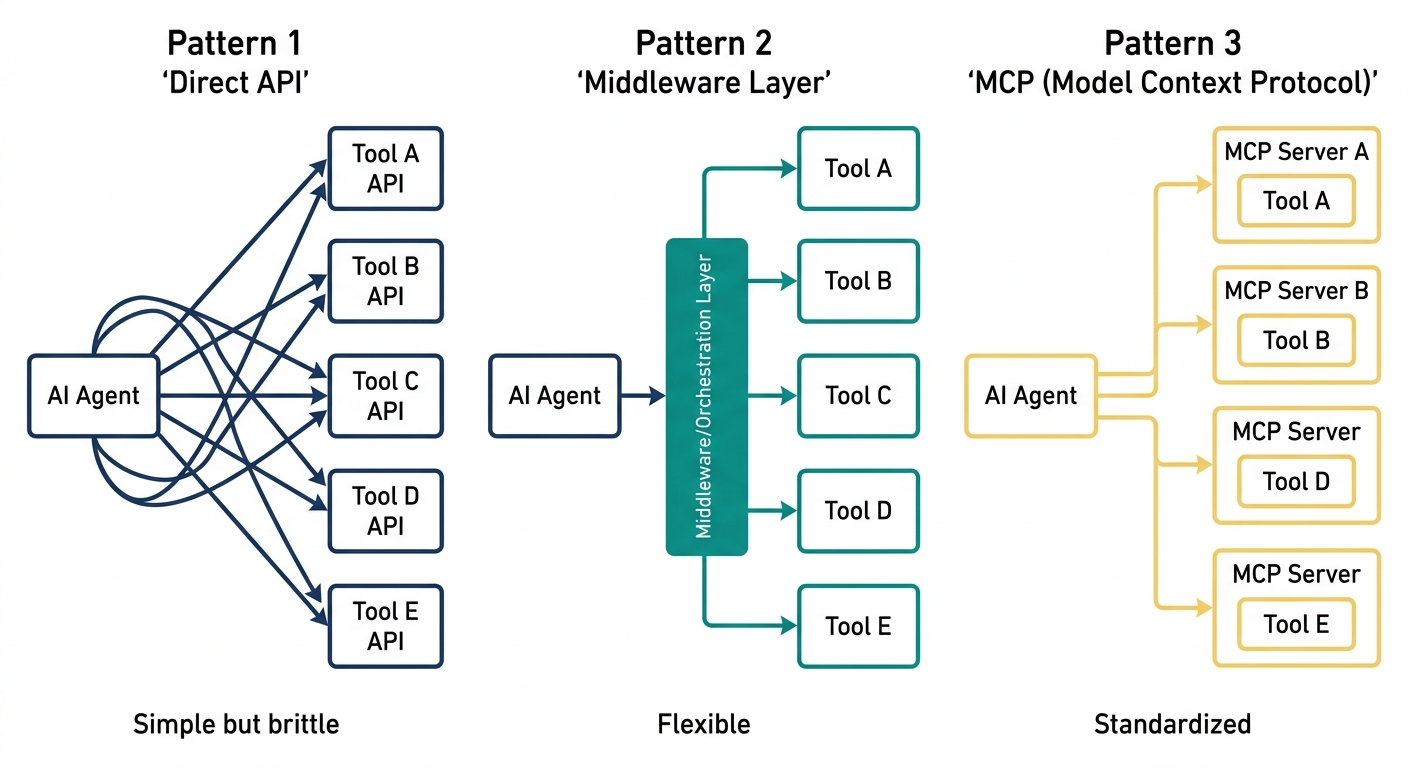
Pattern 1: Direct Tool-Calling
The simplest pattern. Your application defines tools that map directly to API calls against your business systems. The LLM receives user input, decides which tools to call, and your application executes the calls.
User → LLM (with tool definitions) → Tool Call → Your API → Result → LLM → Response
Best for: Single-system integrations with straightforward operations. Example: an agent that queries your CRM to answer sales questions.
Limitations: Becomes unwieldy when the number of tools exceeds 20-30. LLM accuracy in tool selection degrades as the tool list grows.
Pattern 2: Agent with Retrieval-Augmented Generation (RAG)
The agent has access to a vector database containing your company's documents, knowledge base articles, product documentation, or historical data. Before answering questions or deciding on actions, the agent retrieves relevant context from this knowledge store.
Best for: Customer support agents, internal knowledge assistants, and any use case where the agent needs access to large volumes of unstructured data. RAG is essential when the information the agent needs exceeds what fits in the LLM's context window or changes frequently.
Implementation considerations: The quality of your RAG pipeline - chunking strategy, embedding model selection, retrieval ranking, and context window management - determines the agent's accuracy. A poorly configured RAG pipeline produces irrelevant retrievals that confuse the agent and degrade response quality.
Pattern 3: Multi-Agent Orchestration
Complex workflows are handled by multiple specialized agents coordinated by an orchestrator. Each agent has a narrow set of tools and domain expertise. The orchestrator routes tasks to the appropriate agent and aggregates results.
User → Orchestrator Agent → [CRM Agent, Analytics Agent, Support Agent] → Aggregated Response
Best for: Enterprise-scale integrations where a single agent would need hundreds of tools. A customer success platform might have separate agents for CRM data, support ticket management, billing inquiries, and product usage analytics.
Implementation considerations: Inter-agent communication, shared context management, and conflict resolution (when two agents produce contradictory recommendations) add significant complexity. Our engineers recommend starting with Pattern 1 or 2 and evolving to multi-agent only when single-agent tool lists become unmanageable.
Connecting to Common Business Systems
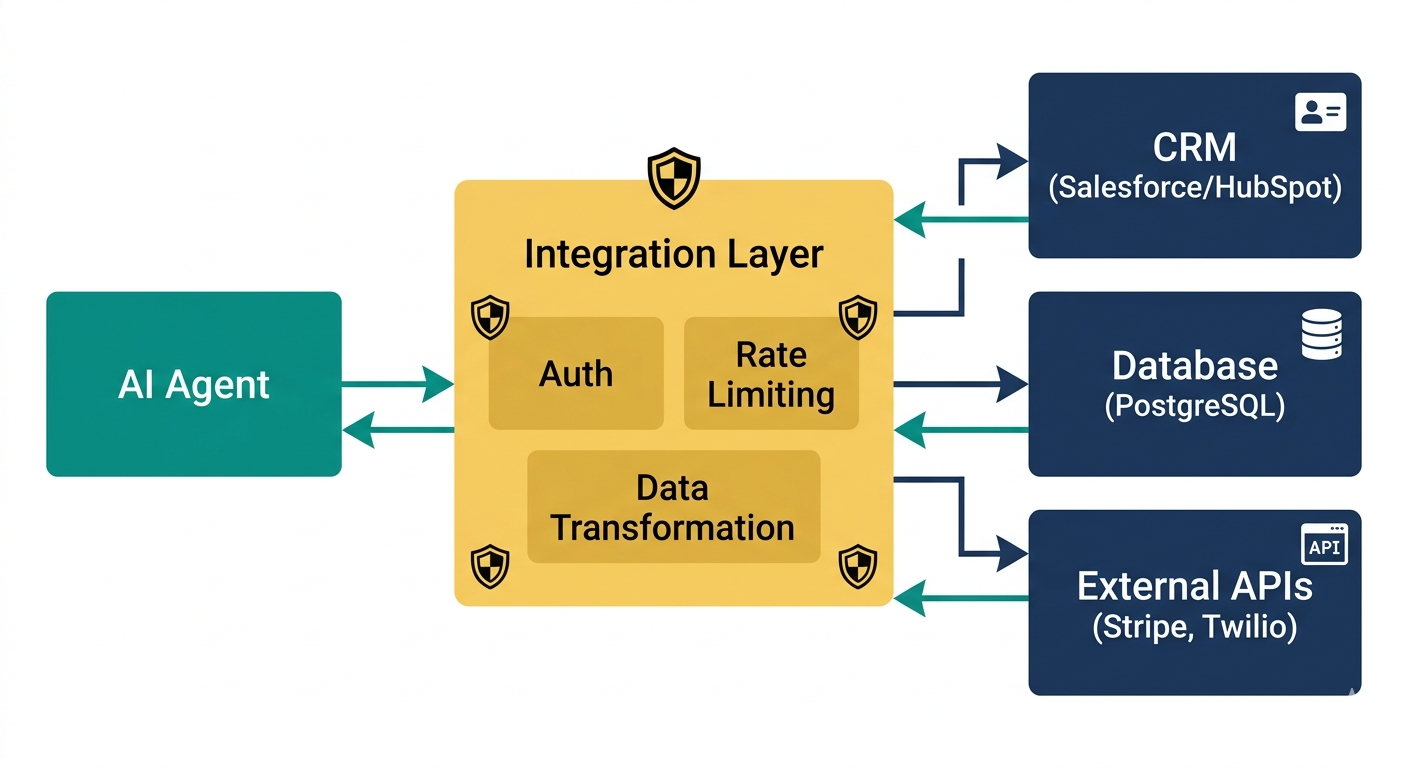
CRM Integration (Salesforce, HubSpot)
CRM integration is the most common starting point for AI agent projects. Typical capabilities include:
- Read: Query contacts, deals, and activity history. "What is the status of the Acme Corp deal?" "Show me all contacts at this company."
- Write: Log activities, update deal stages, create tasks. "Log a call note for this contact." "Move this deal to the proposal stage."
- Analyze: Aggregate pipeline data. "What is our expected revenue this quarter?" "Which deals have been stagnant for more than 30 days?"
Security requirement: CRM systems contain sensitive customer data. The AI agent must operate under a service account with role-based access controls. Use OAuth 2.0 with scoped permissions - the agent should only access the records and fields it needs.
Database Integration
Connecting an AI agent to your production database is powerful but dangerous. A natural-language-to-SQL agent can answer ad-hoc business questions instantly, but an unrestricted agent could also run expensive queries that degrade database performance or, worse, execute destructive writes.
Safeguards our team implements:
- Read-only database replicas: The agent connects to a read replica, never the primary database.
- Query validation: Generated SQL is parsed and validated before execution. Reject queries with no WHERE clause on large tables, queries that join more than 4 tables, or queries estimated to scan more than a configurable number of rows.
- Timeout enforcement: All queries have strict timeouts (typically 5-10 seconds) to prevent runaway operations.
- Result sanitization: PII fields are masked or excluded from results before being sent back to the LLM.
Internal APIs and Microservices
Most organizations have internal APIs that handle business-critical operations: order processing, inventory management, user provisioning, notification dispatch. Connecting these to an AI agent follows the tool-calling pattern, but requires careful API design.
Each tool definition should include:
- Clear description: The LLM uses the description to decide when to call the tool. Vague descriptions like "process data" lead to incorrect tool selection. "Create a new customer support ticket with the given subject, priority, and description" is precise.
- Strict parameter validation: Use JSON Schema or Zod to validate every parameter before execution. Never trust LLM-generated parameters without validation.
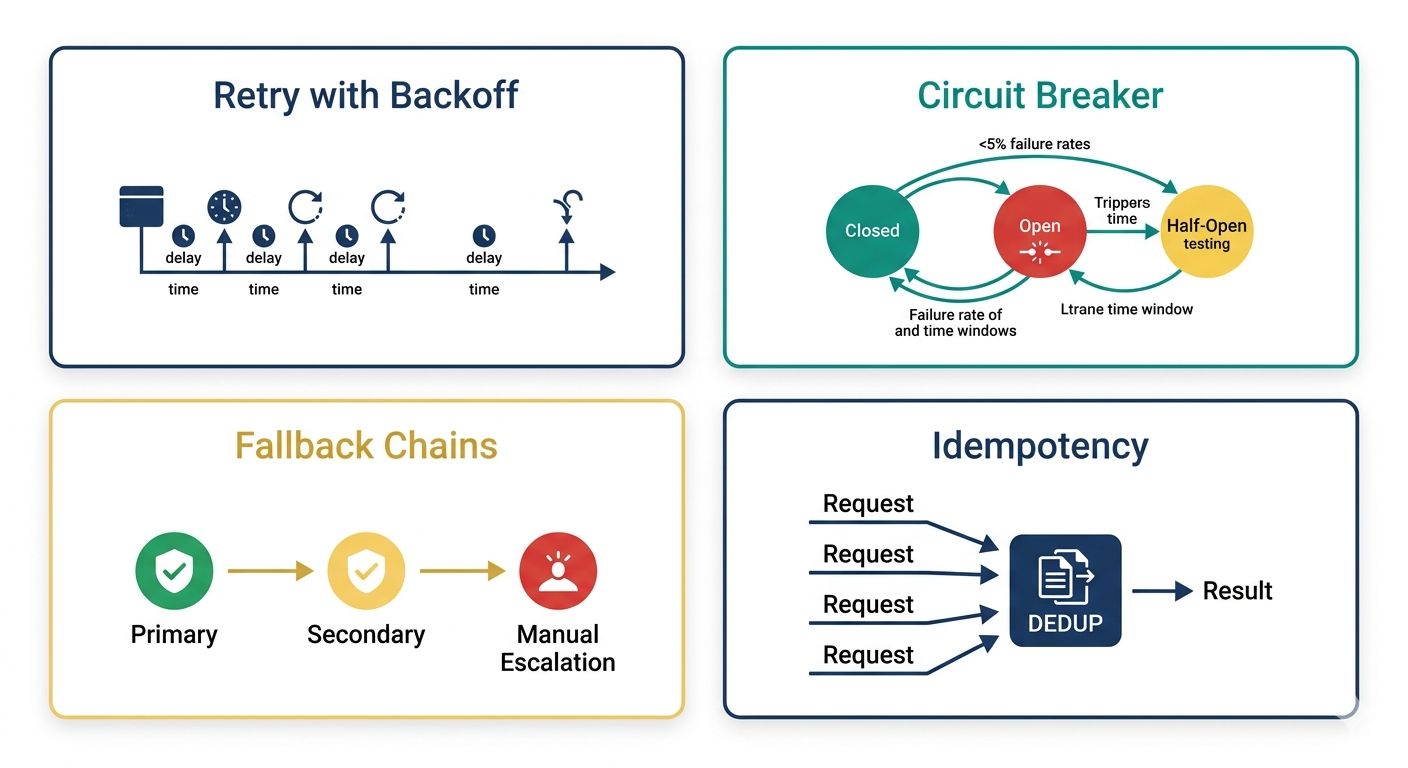
- Idempotency: Where possible, make tools idempotent. If the agent retries a tool call due to a timeout, it should not create duplicate records.
Security and Compliance
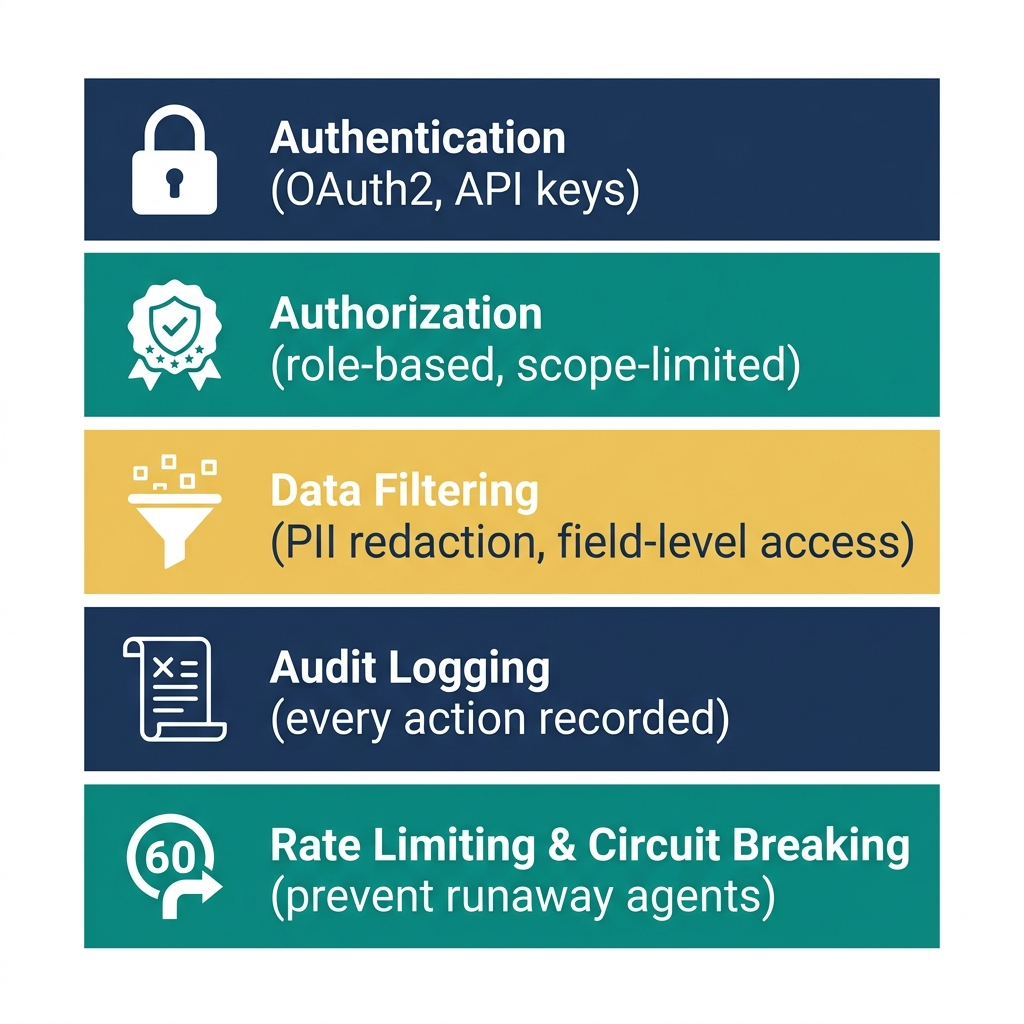
AI agent security requires a fundamentally different mindset from traditional application security. The agent is an autonomous decision-maker that can chain actions in unexpected ways. Security must be enforced at the tool execution layer, not at the LLM layer - you cannot rely on prompt instructions to prevent unauthorized actions.
Principle of Least Privilege
Every tool the agent can access should enforce permissions at the execution layer. If the agent should not be able to delete records, the delete API should reject calls from the agent's service account - regardless of what the LLM generates.
Human-in-the-Loop Checkpoints
For high-impact actions (deleting data, sending external emails, processing payments, modifying access controls), require human approval before execution. The agent can prepare the action and present it for review, but execution should be gated by explicit human confirmation.
Audit Logging
Every tool call - the parameters, the result, the user who triggered the interaction, and the LLM's reasoning - must be logged. This audit trail is essential for debugging, compliance (SOC 2, HIPAA, GDPR), and understanding agent behavior patterns over time.
Prompt Injection Defense
Prompt injection - where malicious input causes the LLM to execute unintended actions - is the top security risk for AI agents. Defense-in-depth strategies include:
- Input sanitization: Strip or escape control characters and known injection patterns.
- System prompt isolation: Use the LLM provider's system prompt or tool-use features that are architecturally separated from user input.
- Output validation: Validate that tool calls match expected patterns. An agent that suddenly tries to access tables it has never accessed before should trigger an alert.
- Sandboxing: Execute agent actions in a sandboxed environment where the blast radius of a compromised agent is limited.
Production Reliability Patterns
Retry and Fallback
LLM API calls fail - rate limits, timeouts, and transient errors are expected. Implement exponential backoff with jitter for LLM calls. For tool calls to business systems, implement circuit breakers that stop calling a failing service and return a graceful error to the agent.
Observability
Monitor these metrics for every AI agent in production:
- Tool call success rate: Broken integrations surface as declining success rates.
- LLM latency (P50, P95, P99): LLM response times vary significantly based on output length and provider load.
- Tool selection accuracy: Track how often the agent selects the correct tool for a given query (requires periodic human evaluation).
- User satisfaction: Thumbs up/down on agent responses provides a direct quality signal.
- Cost per interaction: LLM API costs scale with usage - monitor per-interaction cost to prevent budget surprises.
Our AI agent integration team builds all of these monitoring layers into every production deployment.
Getting Started: A Practical Roadmap
- Week 1-2: Identify one high-value, low-risk use case. Customer support FAQ answering over your knowledge base is the classic starting point.
- Week 3-4: Build a prototype with 3-5 read-only tools. Validate that the agent selects the right tools and returns accurate information.
- Week 5-6: Add security layers - authentication, authorization, audit logging, input validation.
- Week 7-8: Deploy to a pilot group (10-20 internal users). Collect feedback and monitor tool call accuracy.
- Week 9-12: Iterate based on feedback. Add write operations with human-in-the-loop approval. Expand to broader user base.
Our AI agents team can accelerate this timeline by bringing pre-built integration patterns and security frameworks.
FAQ
What LLM should I use for AI agent integration?
The best model depends on your requirements. For complex reasoning and multi-step tool-calling, Claude (Anthropic) and GPT-4 class models (OpenAI) are the current leaders as of 2026. For cost-sensitive applications with simpler tool-calling needs, smaller models like Claude Haiku, GPT-4o-mini, or open-source models (Llama, Mistral) deliver strong performance at significantly lower cost. Our team typically recommends starting with a frontier model for prototyping and then evaluating whether a smaller model meets your accuracy requirements for production.
How do I prevent AI agents from hallucinating when accessing business data?
Hallucination risk drops dramatically when the agent retrieves data through tool calls rather than relying on its training data. The key practices are: (1) always provide the agent with retrieved context rather than asking it to "remember" business facts, (2) instruct the agent to cite tool call results in its responses, (3) implement output validation that cross-references the agent's claims against the actual tool call results, and (4) use structured output formats (JSON) for data-heavy responses so validation is automated.
Is it safe to let AI agents write to production databases?
It can be, with proper safeguards. The critical requirements are: least-privilege database permissions (the agent's service account can only modify specific tables and columns), mandatory human approval for destructive operations (DELETE, TRUNCATE), transaction-level audit logging, and a rollback mechanism for every write operation. Our team recommends running write-capable agents in shadow mode for 2-4 weeks - the agent generates the write operations but they are logged rather than executed, allowing your team to review what the agent would have done before enabling live writes.
How much does AI agent integration cost?
Costs fall into three categories: LLM API costs (typically $0.01-0.15 per interaction depending on model and complexity), infrastructure costs (vector databases, compute, monitoring - typically $500-2,000/month for a production deployment), and development costs. A focused integration project with 5-10 tools, one data source, and production security typically takes 6-10 weeks of engineering effort. Contact our team for a detailed estimate based on your specific requirements.
Ready to connect AI agents to your business tools? Our AI agent integration team builds production-grade integrations that are secure, reliable, and measurably valuable. Get in touch with our team to discuss your use case.