
CI/CD Pipeline Guide: From Zero to Production in 2026
Key Takeaways
- A CI/CD pipeline is the automated workflow that takes code from a developer's commit through building, testing, and deploying to production - eliminating manual handoffs and reducing human error at every stage.
- Continuous Integration (CI) focuses on merging and validating code frequently, while Continuous Delivery (CD) ensures that validated code is always in a deployable state, and Continuous Deployment automates the final step to production.
- The best CI/CD pipelines in 2026 are shift-left by default, running security scans, linting, type checking, and unit tests before integration tests, and only promoting artifacts that pass every gate.
- Pipeline-as-code is non-negotiable. Your CI/CD configuration must live in version control alongside your application code. No click-ops, no snowflake configurations.
- Testing is the backbone of any reliable pipeline. Without comprehensive automated tests, CI/CD is just continuous deployment of bugs.
What Is a CI/CD Pipeline?
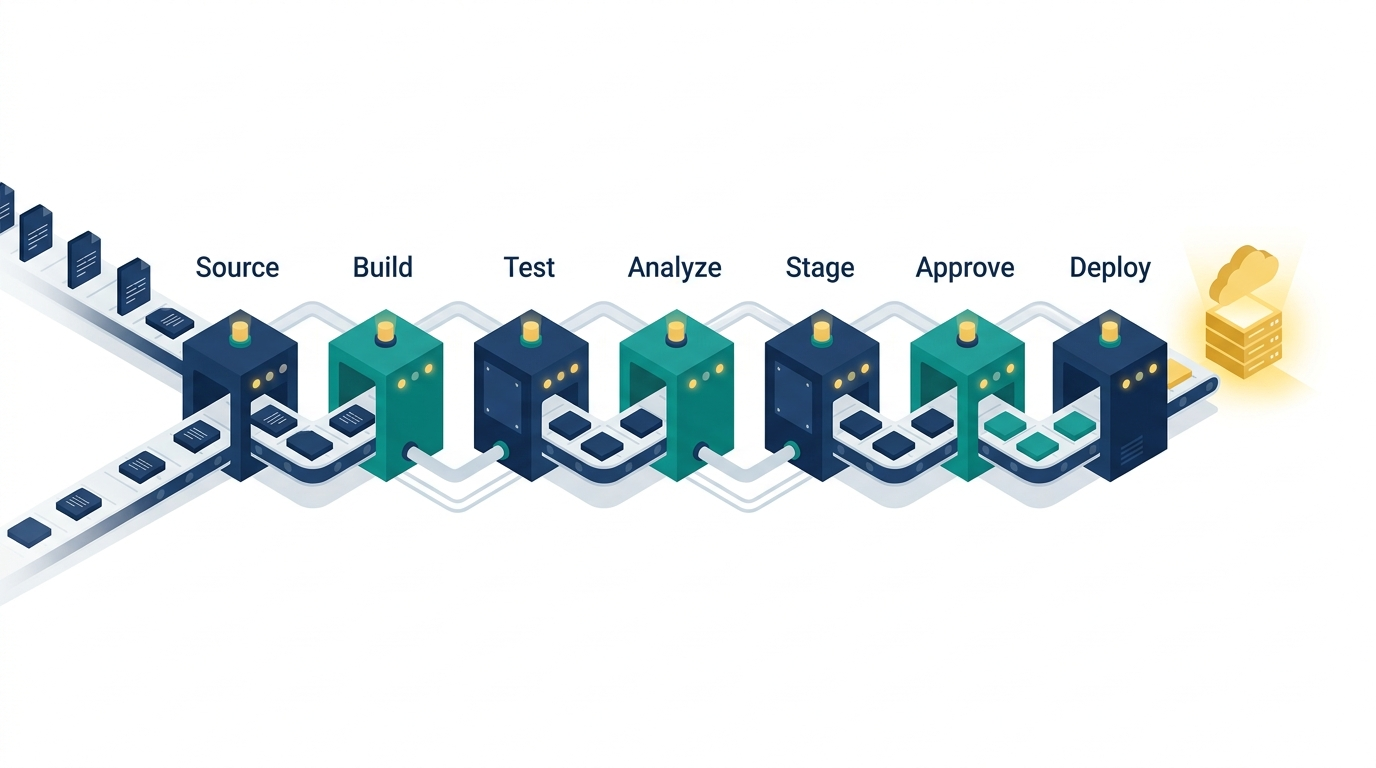
A CI/CD pipeline is an automated sequence of steps that software changes must pass through before reaching production. It typically includes code compilation or bundling, static analysis, unit testing, integration testing, security scanning, artifact creation, staging deployment, acceptance testing, and production deployment.
The term "pipeline" is deliberate. Like an industrial pipeline, each stage filters the flow. Code that fails at any stage is rejected and sent back to the developer with actionable feedback. Only code that passes every gate reaches the end.
At its core, a CI/CD pipeline solves three problems:
- Integration risk. Without CI, developers work in isolation and discover conflicts only when they merge. CI ensures that every commit integrates cleanly with the main branch.
- Deployment risk. Without CD, deployments are manual, infrequent, and terrifying. CD makes deployments routine, reversible, and low-stress.
- Feedback latency. Without a pipeline, developers wait hours or days to learn their code is broken. A well-built pipeline provides feedback in minutes.
Our engineers implemented a CI/CD pipeline for ZTE Corporation's telecom testing infrastructure, where deployment reliability was not optional - it was a contractual SLA. The pipeline reduced deployment failures by 94% and cut release cycles from weeks to hours. Learn more about our CI/CD pipeline services.
CI/CD Pipeline Architecture
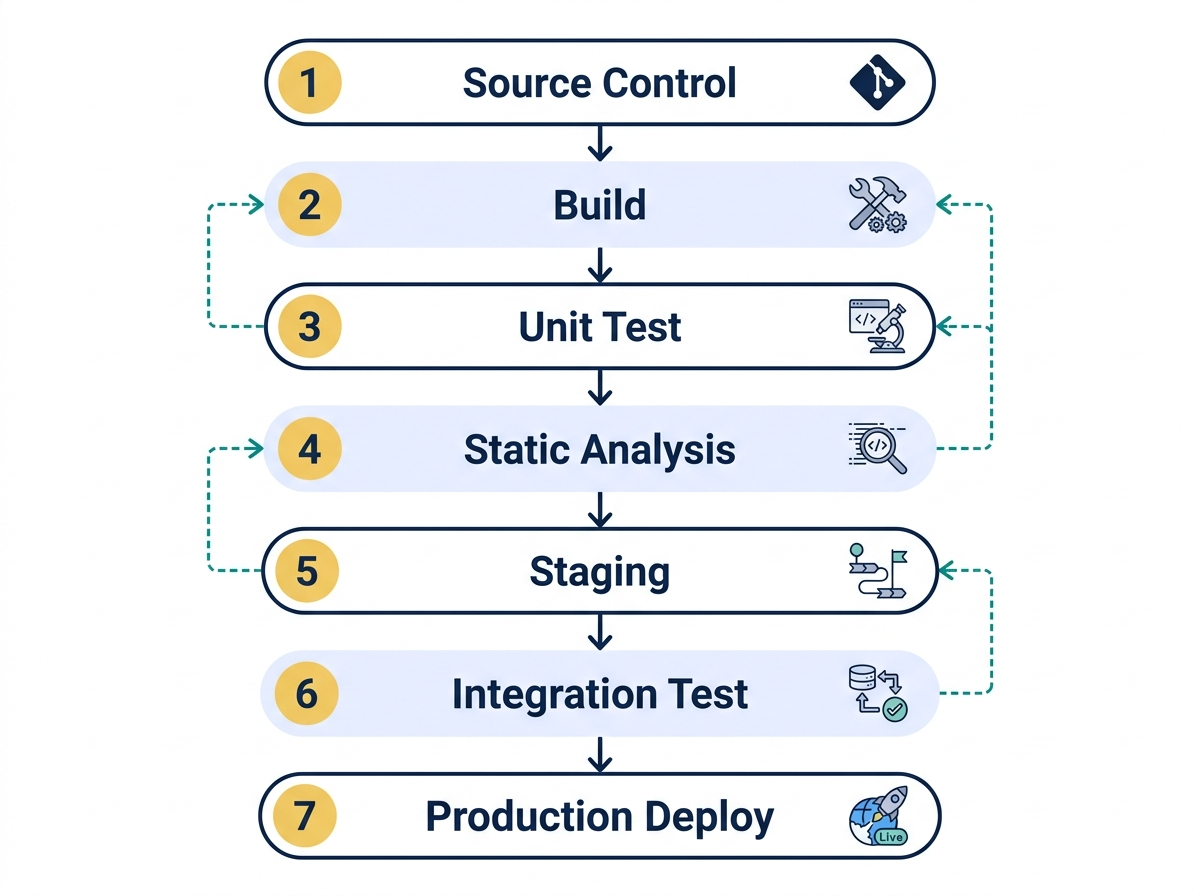
Stage 1: Source Control Trigger
Every pipeline begins with a trigger. The most common trigger is a push to a branch or a pull request event. In 2026, the dominant source control platforms are GitHub, GitLab, and Bitbucket. Each provides native CI/CD capabilities (GitHub Actions, GitLab CI, Bitbucket Pipelines), but many teams use external orchestrators like Jenkins, CircleCI, or Argo Workflows.
Best practice: Use branch protection rules to require pipeline success before merging. Never allow direct pushes to main.
Stage 2: Build
The build stage compiles source code (if applicable), resolves dependencies, and creates a deployable artifact. For compiled languages like Go, Rust, or Java, this produces a binary. For interpreted languages and frontend frameworks, it bundles and optimizes the application.
Key considerations:
- Pin dependency versions with lockfiles (pnpm-lock.yaml, package-lock.json, poetry.lock).
- Use multi-stage Docker builds to minimize image size.
- Cache dependencies between builds. GitHub Actions caches, Docker layer caching, and Turborepo remote caching all dramatically reduce build times.
Stage 3: Static Analysis and Linting
Before running any tests, catch low-hanging issues with static analysis:
- Linting: ESLint, Biome, or Ruff enforce code style and catch common errors.
- Type Checking: TypeScript's
tsc --noEmitor mypy for Python catch type errors at compile time. - Dependency Auditing:
pnpm auditor Snyk CLI flags known vulnerabilities in dependencies.
This stage should complete in under 60 seconds. If it takes longer, your configuration needs optimization.
Stage 4: Unit and Integration Tests
This is where the real quality gate lives. Run your test suite with coverage reporting enabled. Set minimum coverage thresholds and fail the pipeline if coverage drops below the threshold.
- Unit tests should run in parallel and complete in under 3 minutes for most projects.
- Integration tests validate that services, databases, and APIs work together. Use Docker Compose or Testcontainers to spin up dependencies.
- Contract tests verify that API consumers and providers agree on interface specifications. Pact is the leading framework.
Stage 5: Security Scanning
Security must be built into the pipeline, not bolted on after the fact:
- SAST (Static Application Security Testing): Semgrep, CodeQL, or SonarQube scan source code for vulnerabilities.
- SCA (Software Composition Analysis): Snyk, Dependabot, or Trivy scan dependencies for known CVEs.
- Container Scanning: Trivy or Grype scan Docker images for OS-level vulnerabilities.
- Secret Detection: Gitleaks or TruffleHog catch accidentally committed credentials.
Stage 6: Staging Deployment and Acceptance Tests
Deploy to a staging environment that mirrors production. Run end-to-end tests using Playwright or Cypress. Execute smoke tests that verify critical user journeys.
Best practice: Use preview deployments for pull requests. Vercel, Netlify, and Railway provide this out of the box. For backend services, use ephemeral environments provisioned by the pipeline.
Stage 7: Production Deployment
The final stage deploys the validated artifact to production. Deployment strategies include:
- Rolling Deployment: Gradually replace old instances with new ones. Zero downtime, easy rollback.
- Blue-Green Deployment: Run two identical environments. Switch traffic from blue to green atomically. Instant rollback by switching back.
- Canary Deployment: Route a small percentage of traffic to the new version. Monitor error rates and latency. Gradually increase traffic if metrics are healthy.
- Feature Flags: Deploy code to production but control feature visibility through flags. Decouple deployment from release.
Choosing a CI/CD Platform in 2026
| Platform | Best For | Pricing Model |
|---|---|---|
| GitHub Actions | Teams already on GitHub, open-source projects | Free tier + per-minute billing |
| GitLab CI | Self-hosted, single-platform DevOps | Built into GitLab, free tier available |
| CircleCI | Complex pipelines, Docker-native workflows | Per-credit billing |
| Argo Workflows | Kubernetes-native, DAG-based pipelines | Open-source, self-hosted |
| Jenkins | Legacy enterprise, maximum customization | Open-source, self-hosted |
| Dagger | Portable, language-native pipeline definitions | Open-source + cloud offering |
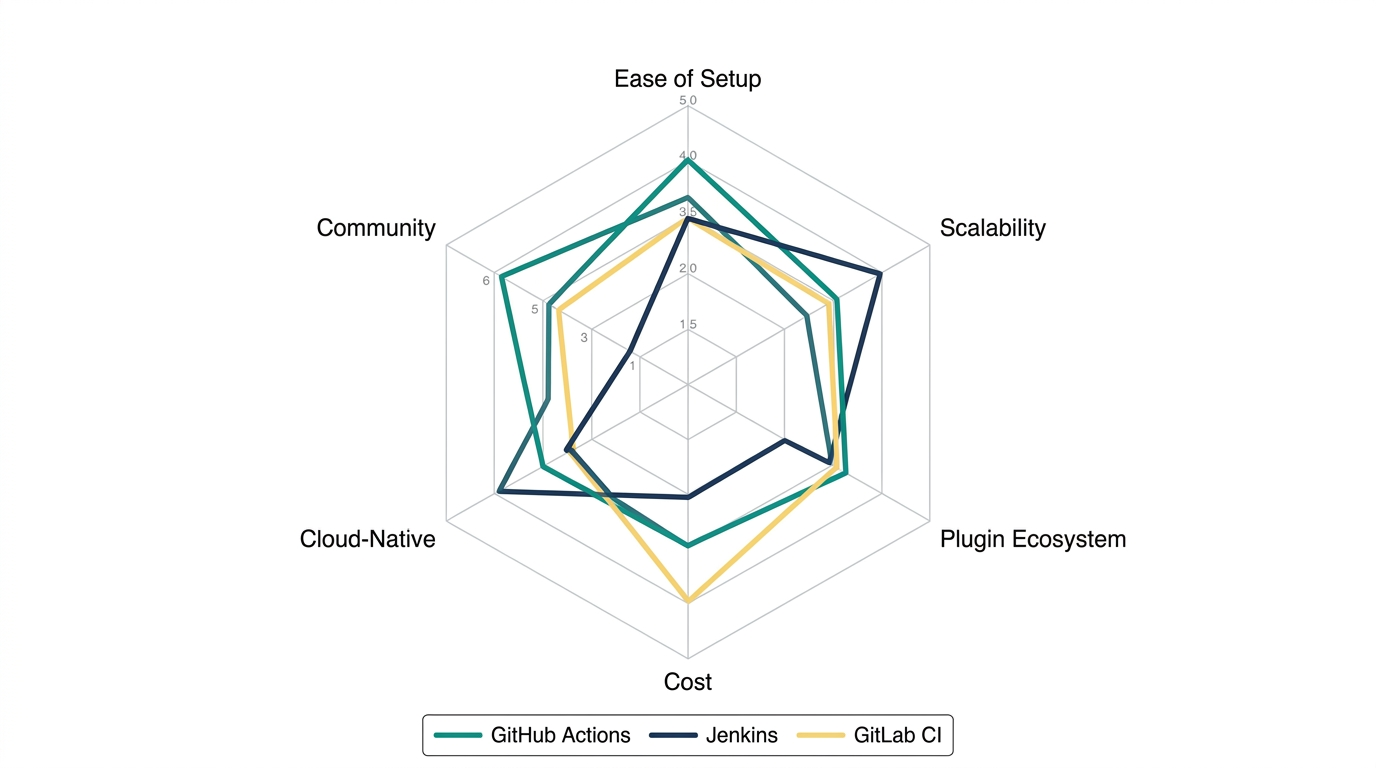
For most teams in 2026, GitHub Actions is the default choice. It integrates natively with the dominant source control platform, has a massive marketplace of reusable actions, and scales from simple to complex without requiring infrastructure management.
Common CI/CD Anti-Patterns
1. The 45-Minute Pipeline
If your pipeline takes more than 15 minutes for a typical commit, developers will avoid running it. Optimize aggressively: parallelize test suites, cache dependencies, use incremental builds, and move slow tests to a nightly schedule.
2. Flaky Tests
Tests that pass and fail randomly erode trust in the pipeline. Developers learn to ignore failures and re-run until green. This defeats the purpose of CI entirely. Quarantine flaky tests immediately and fix or delete them within a sprint.
3. No Rollback Plan
Every deployment strategy must include an automated rollback mechanism. If you cannot roll back a bad deployment in under 5 minutes, your CD process is not production-ready.
4. Manual Approval Gates Everywhere
Manual approvals for production deploys are sometimes necessary (regulated industries, compliance requirements). But manual approvals for staging, QA, or development environments create bottlenecks. Automate every gate that does not have a regulatory or business justification.
Integrating QA into Your CI/CD Pipeline
A CI/CD pipeline without comprehensive testing is just continuous deployment of bugs. Our team recommends the following testing integration pattern:
- Pre-commit: Husky + lint-staged run linters and formatters locally before the code reaches the pipeline.
- CI - Fast feedback (< 5 min): Linting, type checking, unit tests, secret detection.
- CI - Thorough validation (< 15 min): Integration tests, security scanning, contract tests.
- CD - Staging validation (< 10 min): End-to-end tests, visual regression tests, accessibility checks.
- CD - Production verification (< 2 min): Smoke tests, synthetic monitoring, health checks.
Our DevOps services team specializes in designing and implementing this exact pattern. We have built pipelines for fintech companies processing millions of transactions and telecom providers serving hundreds of millions of subscribers.
Frequently Asked Questions
What is the difference between Continuous Delivery and Continuous Deployment?
Continuous Delivery means every commit that passes the pipeline is ready to deploy to production, but a human decides when to push the button. Continuous Deployment removes that human decision - every commit that passes all gates goes to production automatically. Most organizations start with Continuous Delivery and graduate to Continuous Deployment as their test coverage and monitoring mature.
How do I handle database migrations in a CI/CD pipeline?
Database migrations should be version-controlled, forward-only, and backward-compatible. Run migrations as a separate pipeline step before deploying the new application version. Use tools like Drizzle Migrate, Prisma Migrate, Flyway, or Alembic. Always test migrations against a copy of production data in staging before applying to production.
What is pipeline-as-code and why does it matter?
Pipeline-as-code means your CI/CD configuration is stored in a version-controlled file (e.g., .github/workflows/ci.yml or .gitlab-ci.yml) rather than configured through a web UI. This ensures your pipeline is reproducible, auditable, peer-reviewed, and versioned alongside your application code. It is the only acceptable approach in 2026.
How do I secure secrets in a CI/CD pipeline?
Never hardcode secrets in pipeline configuration files. Use your platform's secret management: GitHub Actions Secrets, GitLab CI Variables, or a dedicated vault like HashiCorp Vault or AWS Secrets Manager. Rotate secrets regularly. Use OIDC federation for cloud provider authentication instead of long-lived credentials. Run secret detection tools like Gitleaks in every pipeline run.
How much does it cost to set up a CI/CD pipeline?
The platform cost is often minimal - GitHub Actions offers 2,000 free minutes per month for private repos. The real cost is engineering time to design, implement, and maintain the pipeline. A basic CI/CD pipeline for a standard web application takes 1-2 weeks to implement well. Complex multi-service architectures with custom deployment strategies can take 4-8 weeks. Contact our DevOps team for a scoped estimate based on your specific infrastructure.