
How to Migrate to the Cloud Without Downtime
How to Migrate to the Cloud Without Downtime
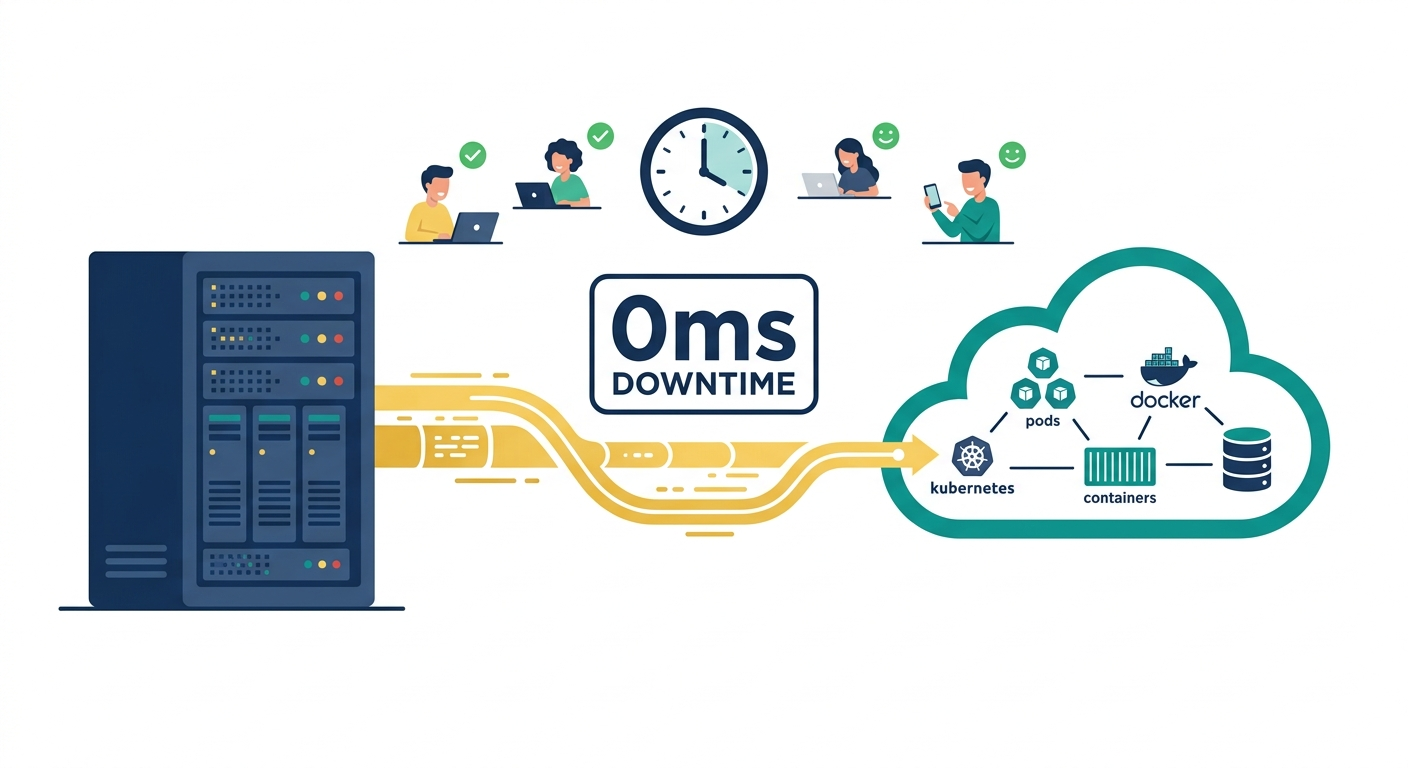
The fear of downtime is the single biggest reason cloud migrations stall. Teams know the business benefits - scalability, cost flexibility, managed services - but the risk of bringing production down during migration paralyzes decision-making. Scheduled maintenance windows are a relic of the on-premise era. In 2026, with the right architecture patterns and migration strategy, zero-downtime cloud migration is not just possible - it is the expected standard.
Our team at QAOcean has executed cloud migrations for companies ranging from early-stage startups to enterprises processing millions of transactions daily. This guide covers the exact strategies, patterns, and tools our engineers use to move workloads to the cloud without any user-facing interruption.
Key Takeaways
- The strangler fig pattern is the safest migration approach - migrate services incrementally while the legacy system continues serving traffic.
- Database migration is the hardest part - use change data capture (CDC) and dual-write patterns to keep source and target databases synchronized during transition.
- Blue-green and canary deployments eliminate the "big bang" cutover risk by shifting traffic gradually.
- A comprehensive rollback plan is not optional - every migration step must be reversible within minutes.
- Automated testing at every stage catches issues before they reach production users.
Why Most Cloud Migrations Fail
Gartner estimates that through 2026, 70% of cloud migrations will experience significant delays or cost overruns. The root causes are predictable:
- Big bang cutovers: Attempting to migrate everything at once over a weekend is the highest-risk approach. A single unexpected issue during cutover extends the maintenance window, and the pressure to "just get it done" leads to shortcuts that create production incidents.
- Insufficient testing: Teams test the migrated application but not the migration process itself. The migration runbook should be rehearsed repeatedly in staging environments that mirror production topology.
- Database migration underestimation: Application migration is comparatively straightforward. Data migration - especially for stateful systems with complex schemas, triggers, and stored procedures - is where migrations break down.
- Ignoring network topology: DNS propagation, TLS certificate management, firewall rules, and latency between hybrid components are frequently overlooked until cutover day.
The Zero-Downtime Migration Framework
Our engineers follow a five-phase framework that systematically eliminates risk.
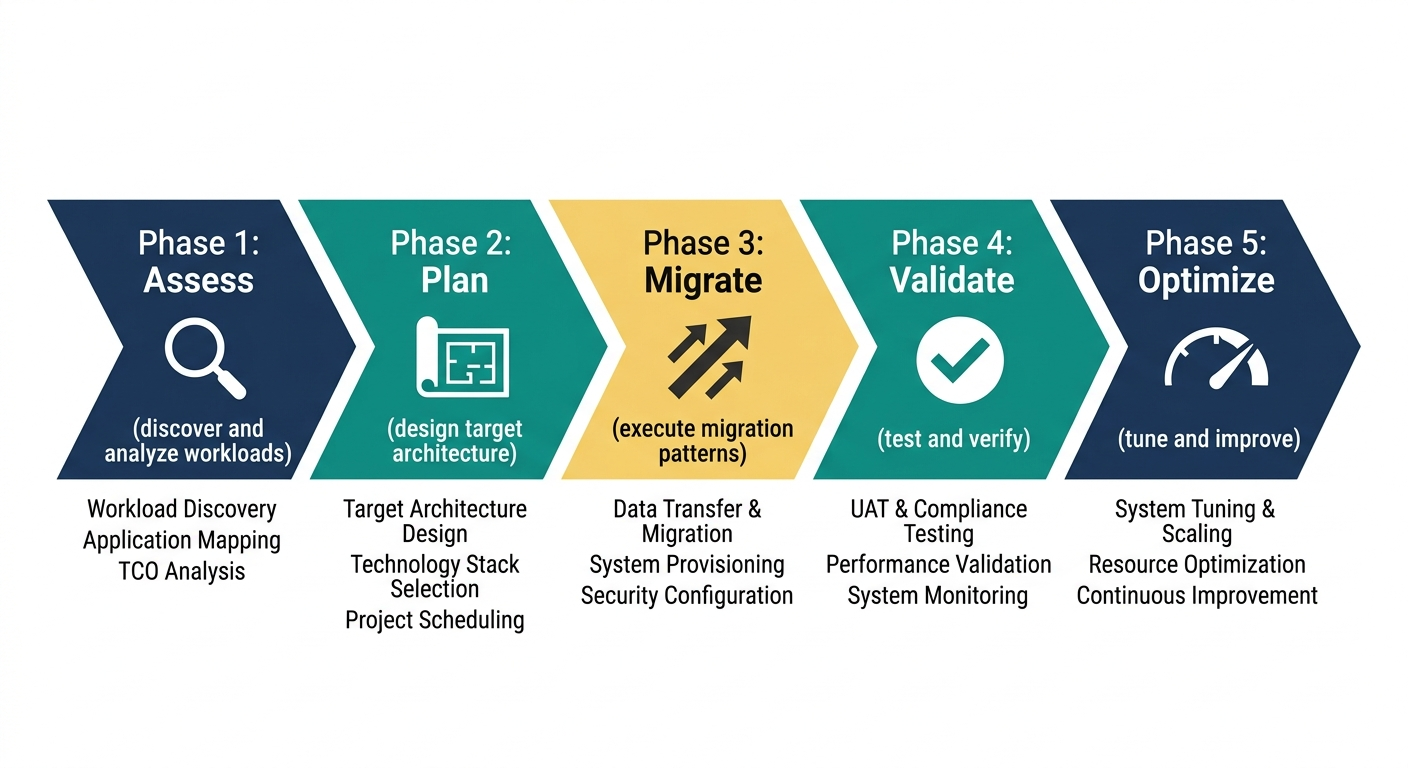
Phase 1: Assessment and Architecture
Before writing any migration code, you need a complete inventory of what you are migrating. This assessment must cover:
- Service dependency mapping: Which services call which? What are the latency requirements between them? Tools like AWS Application Discovery Service, Azure Migrate, or open-source alternatives like Meshery can automate this discovery.
- Data classification: Identify every database, cache, message queue, and file storage system. Classify data by sensitivity (PII, financial, health records) and by migration complexity (size, schema complexity, real-time requirements).
- Performance baselines: Establish current latency percentiles (P50, P95, P99), throughput, and error rates. These baselines become your acceptance criteria post-migration.
- Compliance requirements: Healthcare (HIPAA), financial (SOC 2, PCI DSS), and government (FedRAMP) workloads have specific cloud deployment constraints that must be addressed in the architecture phase, not discovered during migration.
Phase 2: Parallel Infrastructure Setup
Stand up the target cloud environment completely before migrating any workload. This means:
- Infrastructure as Code (IaC): Define all cloud resources using Terraform, Pulumi, or AWS CDK. Never configure cloud resources manually - manual configuration is unrepeatable and undocumented.
- Networking: Establish VPN or Direct Connect links between on-premise and cloud environments. Traffic will flow between both environments during the transition period, and latency on this link directly impacts user experience.
- CI/CD pipelines: Your deployment pipeline should be able to deploy to both the legacy environment and the cloud environment. This is essential for the parallel-run phase.
- Monitoring and observability: Deploy your monitoring stack (Prometheus, Grafana, Datadog, or equivalent) in the cloud environment before any workload arrives. You need visibility from day one.
Our cloud infrastructure team typically completes this phase in 2-4 weeks depending on environment complexity.
Phase 3: Incremental Migration with the Strangler Fig Pattern
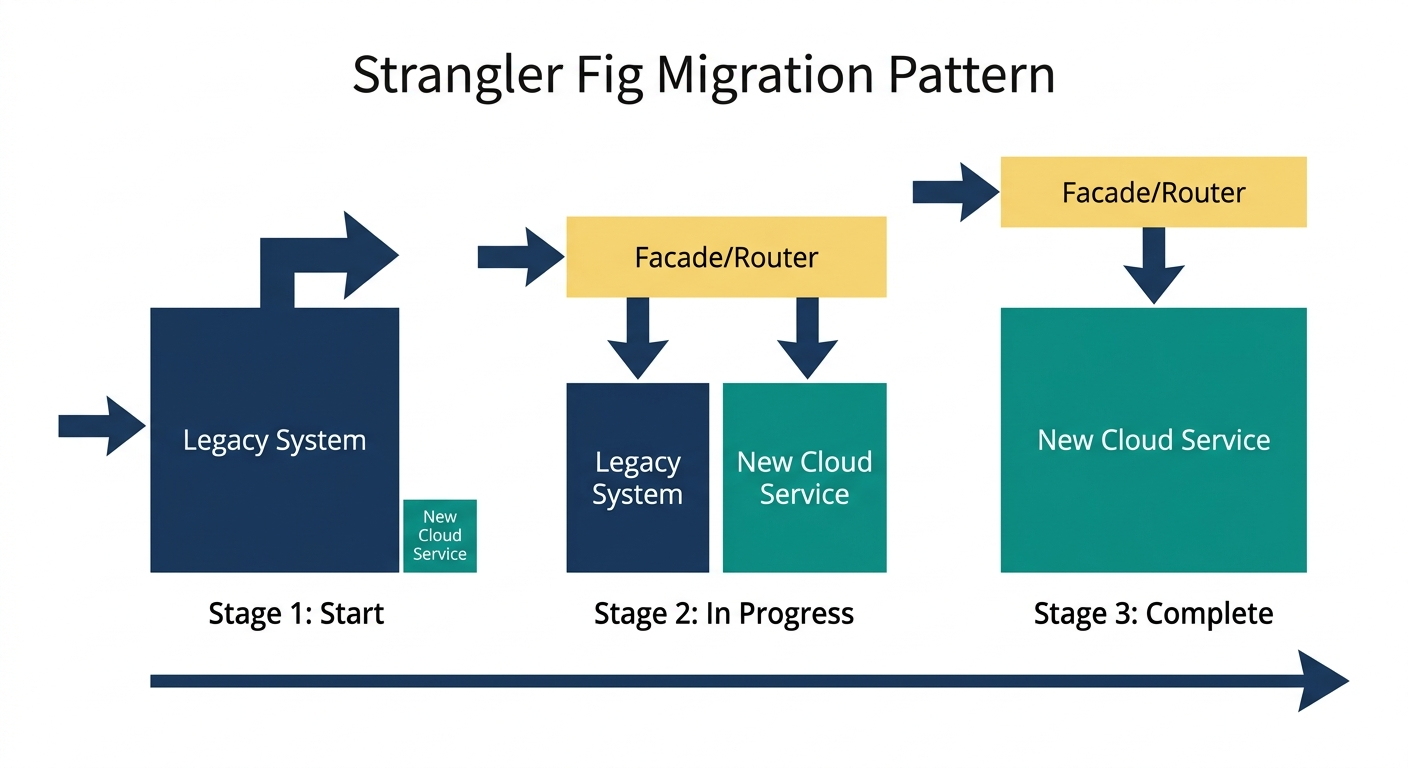
The strangler fig pattern - named after the tropical fig that gradually envelops its host tree - is the safest approach to migration. Instead of migrating everything at once, you migrate one service or one route at a time.
How It Works
- Deploy a routing layer (API gateway, reverse proxy, or load balancer) in front of the legacy system. All traffic flows through this layer.
- Migrate a single low-risk service to the cloud. Deploy it, test it thoroughly in the cloud environment.
- Update the routing layer to direct traffic for that service to the cloud deployment instead of the legacy system. The legacy implementation remains available as a fallback.
- Monitor aggressively for 24-72 hours. Compare latency, error rates, and business metrics against your baselines.
- Repeat for the next service. Move from low-risk to higher-risk services as confidence builds.
This pattern means that at any point during the migration, you can stop and the system continues functioning. There is no "point of no return" where you must push forward regardless of issues.
Traffic Shifting Strategies
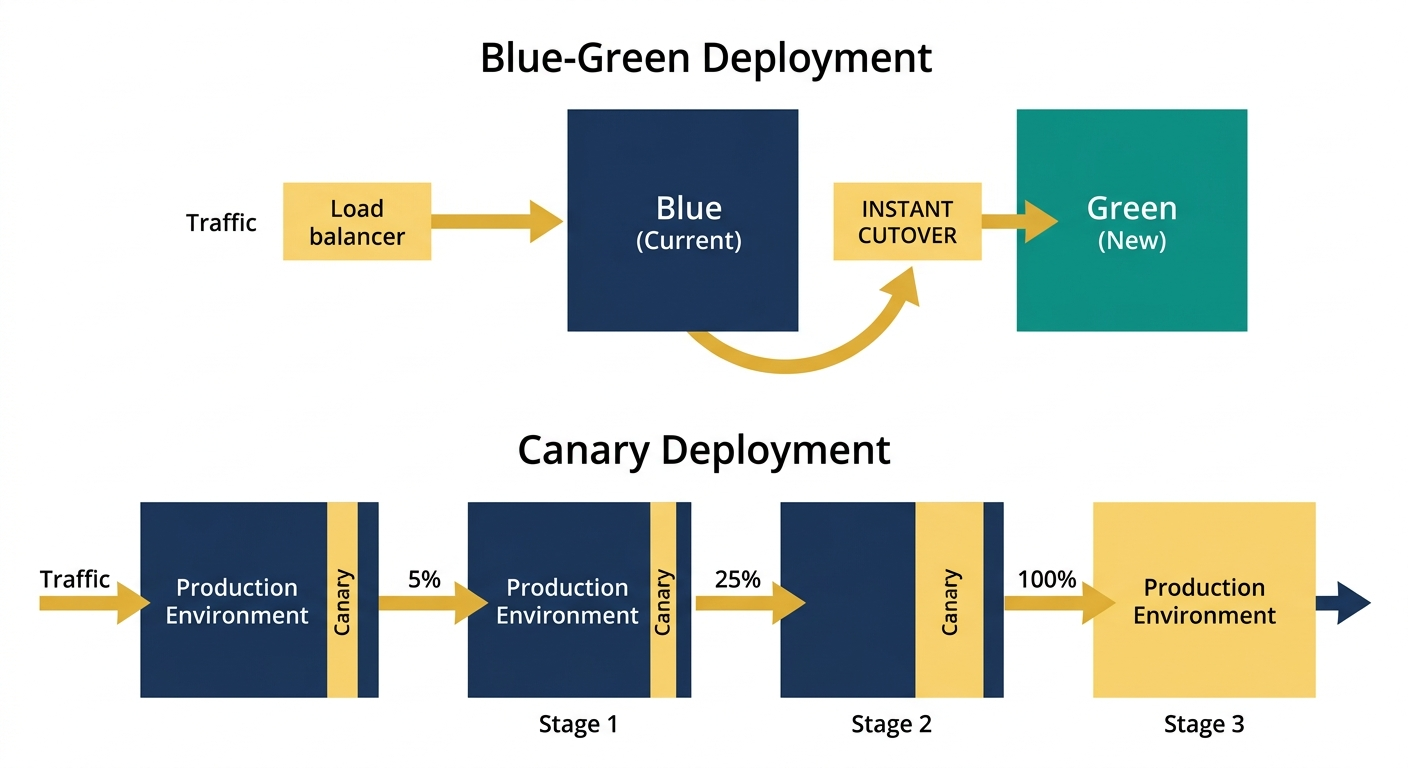
- Blue-green deployment: Run both environments simultaneously and switch DNS or load balancer rules to shift 100% of traffic at once. Simple, but the cutover is all-or-nothing per service.
- Canary deployment: Route a small percentage of traffic (1-5%) to the cloud deployment and gradually increase. This catches issues that only manifest under real traffic patterns.
- Feature flags: Use feature flag systems (LaunchDarkly, Unleash, or a simple configuration service) to route specific users or user segments to the cloud deployment. This is especially useful for testing with internal users before public rollout.
Phase 4: Database Migration
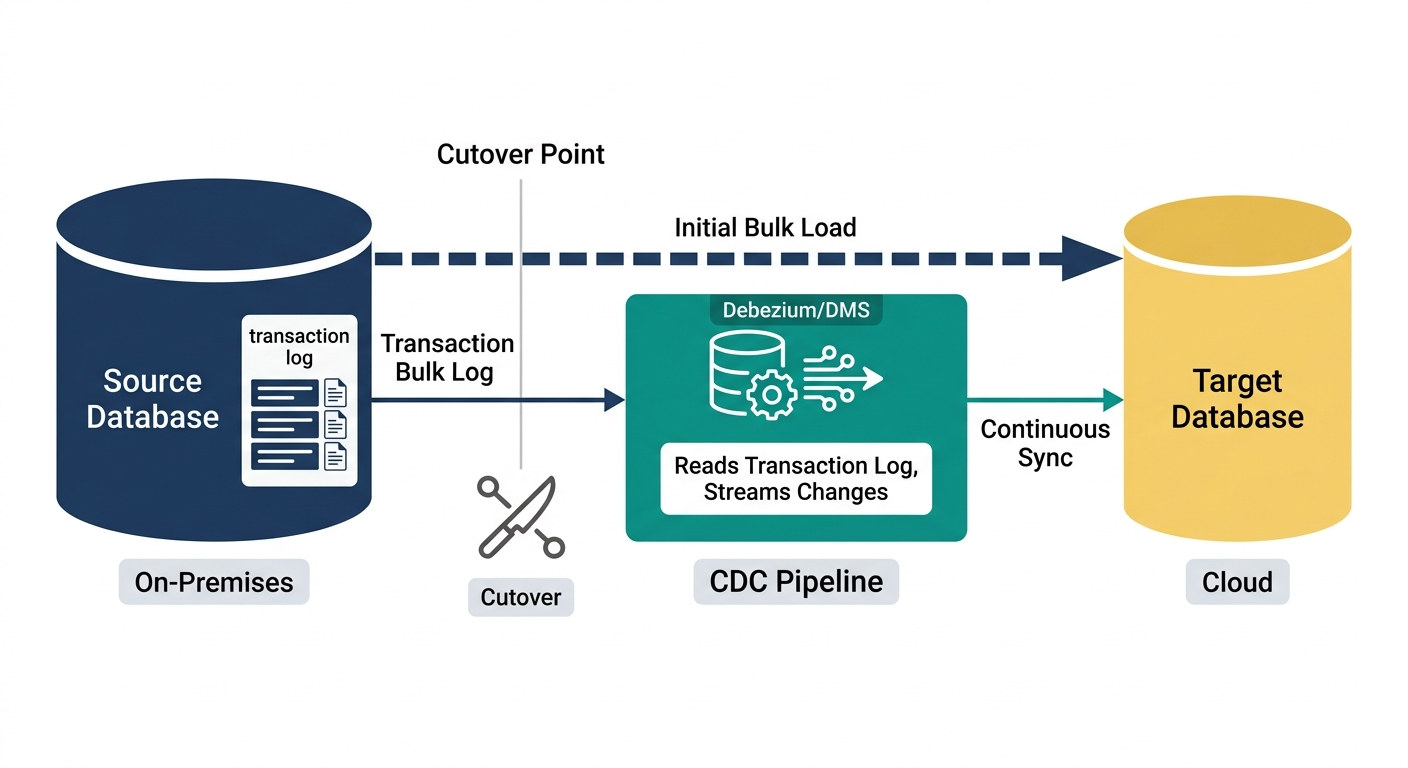
Database migration is where zero-downtime gets difficult. Your application cannot tolerate even momentary data inconsistency. There are three proven approaches.
Approach 1: Change Data Capture (CDC)
CDC tools (AWS DMS, Debezium, Striim) continuously replicate changes from the source database to the target. The process is:
- Initial bulk load: Copy the full database to the target cloud database.
- Continuous replication: CDC captures every INSERT, UPDATE, and DELETE on the source and applies it to the target in near-real-time.
- Validation: Run data validation queries comparing source and target. Row counts, checksums, and random-sample deep comparisons should all match.
- Cutover: When the replication lag is consistently under one second, update the application's database connection string to point to the cloud database. The legacy database continues receiving CDC updates as a hot standby during the monitoring period.
Approach 2: Dual-Write Pattern
The application writes to both the legacy and cloud databases simultaneously. Reads gradually shift from legacy to cloud. This approach gives you real-time validation because both databases should always contain identical data. The downside is increased application complexity and the risk of write inconsistencies if one write succeeds and the other fails.
Approach 3: Event Sourcing Replay
If your application uses event sourcing, you can replay the event log into the new database. This is the cleanest approach when available, as the event log is the single source of truth and the replay is idempotent.
Regardless of approach, never migrate the database and the application simultaneously. Migrate the application first (pointing it at the original database across the network link), verify everything works, then migrate the database as a separate operation.
Phase 5: Validation, Optimization, and Decommissioning
After all services and data are running in the cloud:
- Run the parallel environment for 2-4 weeks with the legacy system on standby. This is your safety net.
- Performance optimization: Cloud workloads often need tuning that differs from on-premise patterns. Autoscaling policies, instance types, and storage IOPS should be calibrated against real production load.
- Cost optimization: Initial cloud deployments are almost always over-provisioned. After two weeks of production data, rightsize instances and storage.
- Decommission legacy infrastructure: Only after the monitoring period confirms stable operation.
Real-World Migration: Lessons from Our Projects
When our team migrated a healthcare platform for a client, the primary challenge was HIPAA compliance - patient health information required encryption at rest and in transit, audit logging for every data access, and strict access controls. We used the strangler fig pattern with CDC-based database migration, completing the full migration over six weeks with zero user-facing downtime. The key decision was migrating the least regulated services first, building confidence and operational muscle before tackling PHI-containing systems.
In another engagement working with EnMedical, our engineers built cloud-native infrastructure from the ground up, implementing CI/CD pipelines and monitoring that reduced deployment time and increased system reliability.
Our DevOps team brings this experience to every migration engagement.
Migration Checklist
Before starting your migration, verify each item:
- Complete service dependency map documented
- Performance baselines recorded (P50, P95, P99 latency; throughput; error rates)
- Target cloud infrastructure defined in IaC and deployed to staging
- VPN or Direct Connect link established with latency measured
- CI/CD pipeline deploying to both environments
- Monitoring and alerting configured in target environment
- Database migration strategy selected and tested in staging
- Rollback procedures documented and rehearsed
- Compliance requirements mapped to cloud controls
- Communication plan for stakeholders prepared
FAQ
How long does a zero-downtime cloud migration take?
For most mid-size applications (10-50 services, 1-10 databases), our team estimates 8-16 weeks from assessment to legacy decommissioning. The timeline depends heavily on database complexity, compliance requirements, and the number of external integrations. Simple applications with a single database can migrate in 2-4 weeks. Enterprise systems with hundreds of services and petabytes of data can take 6-12 months. The key insight is that zero-downtime migration trades calendar time for risk reduction - it takes longer than a big-bang cutover, but the risk of extended outage drops to near zero.
What is the cost of running two environments during migration?
During the parallel-run phase, you are paying for both legacy infrastructure and cloud infrastructure. For most organizations, this overlap period costs 30-60% more than steady-state spending. However, this cost is predictable and time-limited. Compare it against the cost of a failed big-bang migration: extended downtime, emergency vendor support, customer churn, and SLA penalties. The parallel-run approach is almost always cheaper in total cost of ownership.
Can we migrate databases with zero downtime if we have terabytes of data?
Yes, but the initial bulk load must be carefully planned. For multi-terabyte databases, the initial snapshot and transfer can take hours to days depending on network bandwidth. CDC replication then handles ongoing changes. The critical metric is replication lag - as long as the target database catches up to the source before cutover, the size of the initial load is a logistics problem, not a downtime risk. Tools like AWS DMS, Azure Database Migration Service, and Google Database Migration Service handle multi-terabyte migrations routinely.
Should we re-architect during migration or do a lift-and-shift first?
Lift-and-shift first, re-architect second. Attempting to modernize your architecture during migration introduces two categories of risk simultaneously - migration risk and architecture risk. Our recommendation is always to migrate the existing workload as-is, verify it runs correctly in the cloud, and then modernize iteratively once you have a stable cloud baseline. The exception is when the legacy architecture is fundamentally incompatible with cloud deployment (for example, applications hardcoded to specific filesystem paths or local network addresses).
How does QAOcean support cloud migrations?
Our cloud infrastructure and DevOps teams handle end-to-end cloud migration - from initial assessment through post-migration optimization. We bring experience across AWS, Azure, and GCP, with specialized expertise in regulated industries (healthcare, fintech). Contact us to schedule a migration assessment.
Planning a cloud migration? Our engineers have migrated workloads across fintech, healthcare, and SaaS platforms with zero downtime. Get in touch with our team to start your migration assessment.